
Yes, by default xAI can use your public X posts and your Grok interactions to train and fine-tune its models. You can opt out: on grok.com go to Settings, then Data, then de-select Improve the Model, and Private Chat is also excluded from training. After you opt out, new conversations are not used for training, though feedback you volunteer still can be.
Yes, Grok can train on your data by default, and that includes both your public posts on X and the things you type into Grok. The good news is that you can turn most of it off in a couple of minutes, and this guide walks through exactly where the settings live and what each one does.
Two facts frame everything below. First, the default is on: unless you change a setting, xAI is permitted to use your public X content and your Grok interactions, inputs, and results to train and fine-tune its models. Second, the fix is a setting, not a support ticket: the main control is a single toggle in your account, and Private Chat gives you a stronger option for sensitive prompts. Everything else is detail.
What xAI can use, and when
It helps to separate the two data streams, because they are governed in different places.
The first stream is your public activity on X. If you post publicly, that content can feed model training. This is not unique to Grok; it is the logic of a platform that also runs an AI lab. What matters for you is that the control for it lives in your X and Grok settings, not in some hidden backend.
The second stream is your Grok usage itself: the prompts you write, the outputs you get back, and your interactions with the assistant. By default those can be used to improve the models. This is the stream most people forget about, because it feels private in the moment even though it is not private by default.
The practical takeaway is that "using Grok" and "letting Grok learn from you" are two separate choices. You can do the first without the second once you change the setting. If you want the fuller picture of how Grok access works across surfaces, the Grok on X data and privacy settings guide covers the surrounding controls.
The one setting that turns off training
Here is the core action. On grok.com, open Settings, then Data, and find the option described as Improve the Model. De-select it. That is the switch that stops your future conversations from being used to train and fine-tune xAI models.
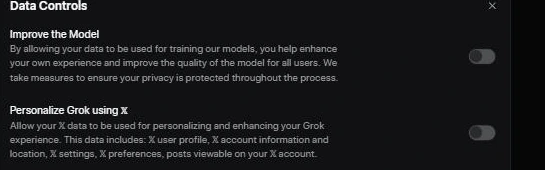
A few things are worth knowing about what that toggle does and does not do:
- It applies going forward. Once you opt out, new conversations are not used for training. It is not a button that reaches back and unwinds training that already occurred, which is why the timing of your opt-out matters.
- It is account-level. The setting attaches to your account and your logged-in usage, so make sure you are opted out on the account you actually use.
- It is separate from deleting chats. Turning off training and clearing your chat history are different actions. You may want both, but one does not do the other.
If you only do one thing after reading this, do that one. It is the highest-leverage privacy action available to a normal Grok user, and it takes less time than reading this paragraph.
Private Chat, and when to use it
Alongside the training toggle, Grok offers a Private Chat mode whose conversations are excluded from training. Think of it as a stronger setting for individual sensitive sessions rather than a global default.
The two controls work well together. The Improve the Model opt-out is your baseline: it covers your ordinary usage. Private Chat is your escalation: when you are about to paste something you would not want in a training set, start a private session so that conversation is excluded regardless of your other settings.
That said, Private Chat is not a license to be careless. Excluding a conversation from training is not the same as making it safe to share secrets, credentials, health details, client data, or anything regulated. The safest habit with any AI tool, Grok included, is to summarize or redact sensitive specifics before you type them. Private Chat lowers one risk; it does not remove your judgment from the loop.
Step by step, the short version
If you want the whole thing as a checklist you can run once and forget, here it is:
- Sign in to grok.com on the account you actually use.
- Open Settings.
- Open the Data section.
- De-select Improve the Model. This stops future conversations from being used for training.
- For sensitive prompts, start a Private Chat so that session is excluded from training too.
- If you also want to clear history, do that separately in the same settings area.
- Re-check these settings after major product updates, because menus move and defaults can change.
The whole pass takes a couple of minutes and only needs to be done once per account, plus an occasional re-check. That last step matters more than it sounds, because a setting you enabled last year is only useful if the product has not quietly reorganized it since.
What opting out does not change
Setting expectations correctly is part of doing this properly, so here is what the opt-out does not do.
It does not make Grok anonymous. You still have an account, xAI still operates the service, and normal operational data handling still applies. Opting out of training is a specific choice about model improvement, not a cloak.
It does not cover feedback you volunteer. If you actively submit feedback, such as rating a response or flagging an answer, that voluntarily provided input can still be used to improve the product. That is a reasonable carve-out, but it means opting out of training and then hand-feeding the system feedback are slightly at odds. If your goal is minimal contribution to training, be sparing with feedback too.
It does not retroactively erase prior training. As covered above, the toggle is forward-looking. The value of opting out compounds the earlier you do it, which is the single best argument for changing the setting today rather than bookmarking this page.
EU and UK users: a different baseline
If you are in the European Union or the United Kingdom, your data is handled under a separate Europe privacy addendum from xAI, and that document is the right reference for your specific rights. Regional rules also change some edge behavior. For example, the opt-out experience for logged-out users is not the same everywhere, and some regions have stronger default protections than others.
The action is still the same: open your settings and turn off Improve the Model. But if you care about the legal specifics, such as your rights to access or deletion, read the addendum rather than relying on a general guide, including this one. Privacy rights are exactly the kind of thing where the primary document beats a summary.
Why the default is set the way it is
It is worth understanding why training is on by default, because it explains the whole design and helps you make a calm decision rather than an alarmed one.
Modern assistants improve partly by learning from real usage. Broad default opt-in gives the lab a large, current stream of interactions to learn from, which is commercially valuable and, for the company, the point of running the service at scale. That is the incentive. It is not a scandal; it is the standard arrangement across much of the industry, and being clear-eyed about it is more useful than being outraged by it.
Your incentive is different. You get the same assistant whether or not your conversations feed training, so for you the opt-out is close to free. You lose nothing you can feel, and you keep your prompts and outputs out of the training pipeline. When the cost to you is near zero and the benefit is a smaller data footprint, opting out is the rational default even if the company set the opposite one.
A sensible privacy posture for everyday Grok use
Pulling it together, here is a posture that is strict enough to matter without being so cautious that you stop using the tool.
Set the baseline once: opt out of Improve the Model on your account. That covers the bulk of the concern with a single toggle.
Escalate when needed: use Private Chat for any session where the content is sensitive, and redact specifics before you paste them. Treat the two as a baseline and an escalation, not as alternatives.
Keep the surfaces straight: remember that Grok on X and Grok on grok.com are related but separate, and that your account settings are the source of truth for what is happening. If you are choosing between assistants partly on trust, the same discipline applies to all of them, which is a point the Grok versus ChatGPT, Claude, and Gemini comparison makes about testing rather than assuming.
Re-check periodically: privacy settings are only as good as the last time you confirmed them. A short check after big product updates keeps your choices intact.
Grok on X versus grok.com: two places to check
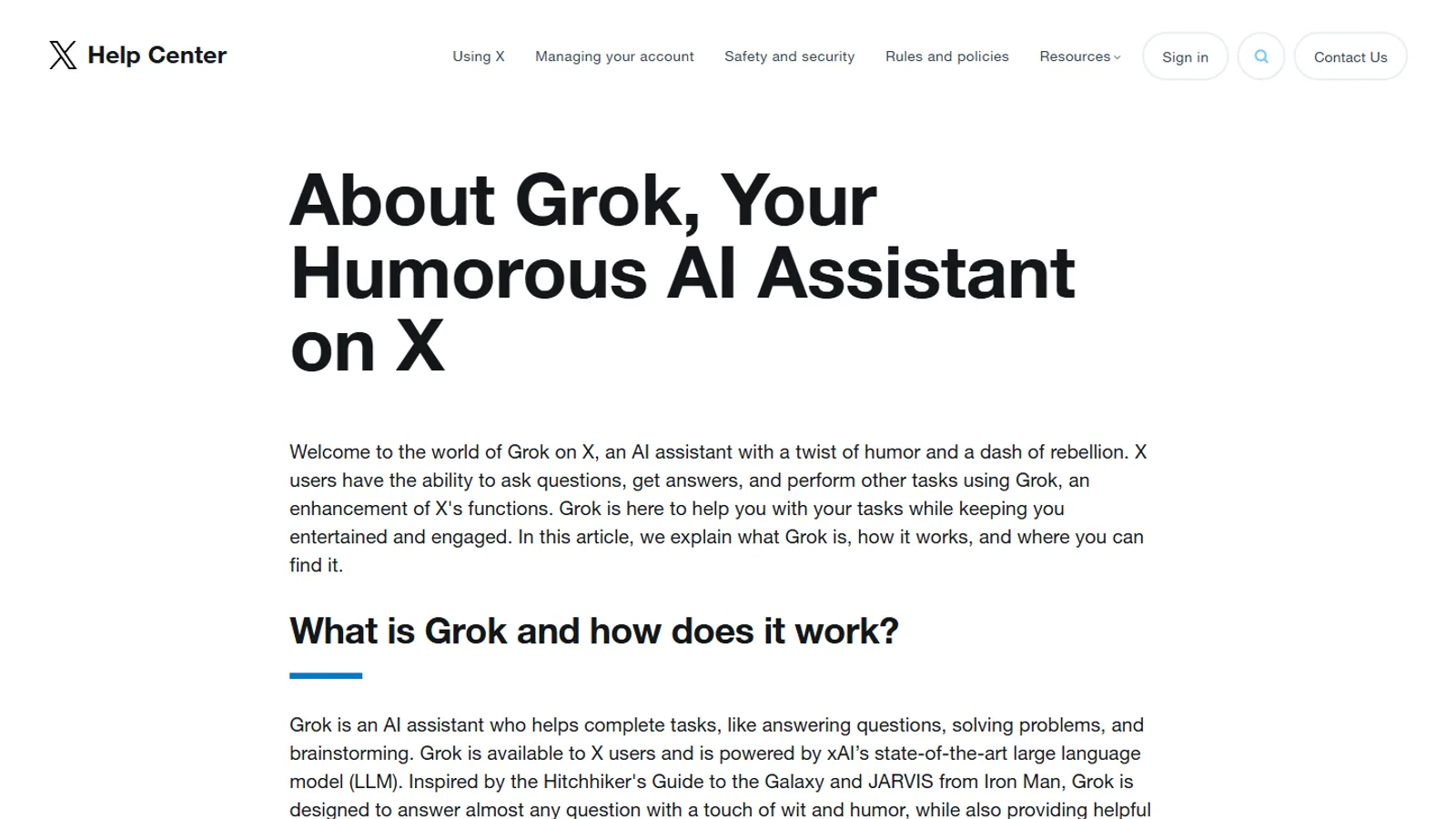
Grok access on X is tied to an X Premium or Premium Plus subscription, and X is a separate product surface from grok.com even though the same company runs both. That means the settings you care about can live in two places. The Improve the Model opt-out on grok.com governs your standalone Grok usage. Your X account settings and the official About Grok on X help page govern how Grok behaves inside the X app, including how your public X content is treated.
If you use Grok in both places, check both. It is easy to opt out on grok.com, assume you are covered everywhere, and still be contributing through the surface you did not touch. The rule of thumb is simple: wherever you actually use Grok, open the settings for that surface and confirm the training control for yourself rather than trusting a single toggle to travel with you.
Deleting chats and asking about your data
Turning off future training is the forward-looking control. If you also want to reduce what already exists, that is a separate set of actions. You can clear your Grok chat history from the same settings area, which removes those conversations from your account view. Data access and deletion requests are a further step again, handled through xAI's privacy process rather than a single in-app button, and the Europe addendum is the right reference for EU and UK users who want to exercise formal access or deletion rights.
Keep the three ideas distinct. Opting out stops new training. Clearing history removes conversations from your account view. A formal data request is about what xAI holds. Doing one does not automatically do the others, so decide which you actually need. For most people, the training opt-out plus the occasional history clear is enough. For anyone handling regulated or client data, the formal route, and frankly not putting that data into a consumer assistant at all, is the safer path.
A note for teams and businesses
If you use Grok through a business arrangement rather than a personal account, the data posture is different by design. xAI states that Business and Enterprise data is not used to train its models, with Enterprise adding custom retention terms. That is a meaningful distinction: a company evaluating Grok for staff should not extrapolate from the consumer default, because the business tiers are built around not training on your data in the first place.
If your use is work related and the data is sensitive, the consumer opt-out is the wrong tool. The right move is to evaluate Grok Business or Enterprise through official channels so the data terms are contractual rather than a personal toggle. The SuperGrok plans and pricing guide explains where the business tiers sit relative to personal plans.
Bottom line
Grok trains on your data by default, across both your public X activity and your Grok interactions, but you can opt out in a couple of minutes. On grok.com, open Settings, then Data, and de-select Improve the Model, and use Private Chat for sensitive sessions. Opting out applies going forward, so do it sooner rather than later, and if you are in the EU or UK, read the Europe privacy addendum for your specific rights. The setting is nearly free to you and keeps your prompts out of the training pipeline, which makes it one of the easiest privacy wins you can claim today.
Questions readers ask
Does Grok train on my data by default?
Yes. Unless you opt out, xAI can use your public X content and your Grok interactions, inputs, and results to train and fine-tune its models. The controls to turn this off are in your account settings.
Where is the setting to stop Grok training?
On grok.com, open Settings, then Data, and de-select the Improve the Model option. That stops your future conversations from being used for training.
Does opting out delete data already used?
Opting out applies going forward. It stops new conversations from being used for training. It is not a promise to unwind training that already happened, so opt out sooner rather than later if this matters to you.
What is Private Chat?
Private Chat is a mode whose conversations are excluded from training. It is a useful option for sensitive prompts, though you should still avoid putting secrets or regulated data into any AI tool.
Are the rules different in the EU or UK?
Yes. EU and UK users are covered by a separate Europe privacy addendum, and in some regions the opt-out behavior for logged-out users differs. Check the addendum and your in-account settings for your region.