

Grok Imagine is xAI's image and video generation product, built on the Aurora line. It runs on grok.com/imagine, in the Grok apps, and through the xAI API, and every output carries a mandatory Grok watermark.
Grok Imagine is xAI's image and video generation product, built on the Aurora model line. It lets you turn a text prompt or a starting image into a still image or a short video, and it runs in three places: the web page at grok.com/imagine, the Grok mobile apps, and the xAI developer API. If you have used Grok only for chat, Imagine is the part that moves it into visual work, and it behaves more like a creative drafting tool than a finished-asset factory.
This explainer covers what Imagine actually is, where it lives, the rules that apply to every output, and the limits you need to check before you build a workflow around it. The goal is to help you decide whether it fits your need before you spend time testing. Two things matter most up front: every Imagine output carries a mandatory Grok watermark, and the resolution you get depends on your plan tier. Everything else follows from those facts.
What Grok Imagine actually is
Grok Imagine is the image and video half of Grok, separate from the chat, research, and coding sides of the product. It is part of xAI's Aurora line, which is the family of generative visual models behind the feature. When people say "Grok can make images and videos now," Imagine is the thing they are describing.
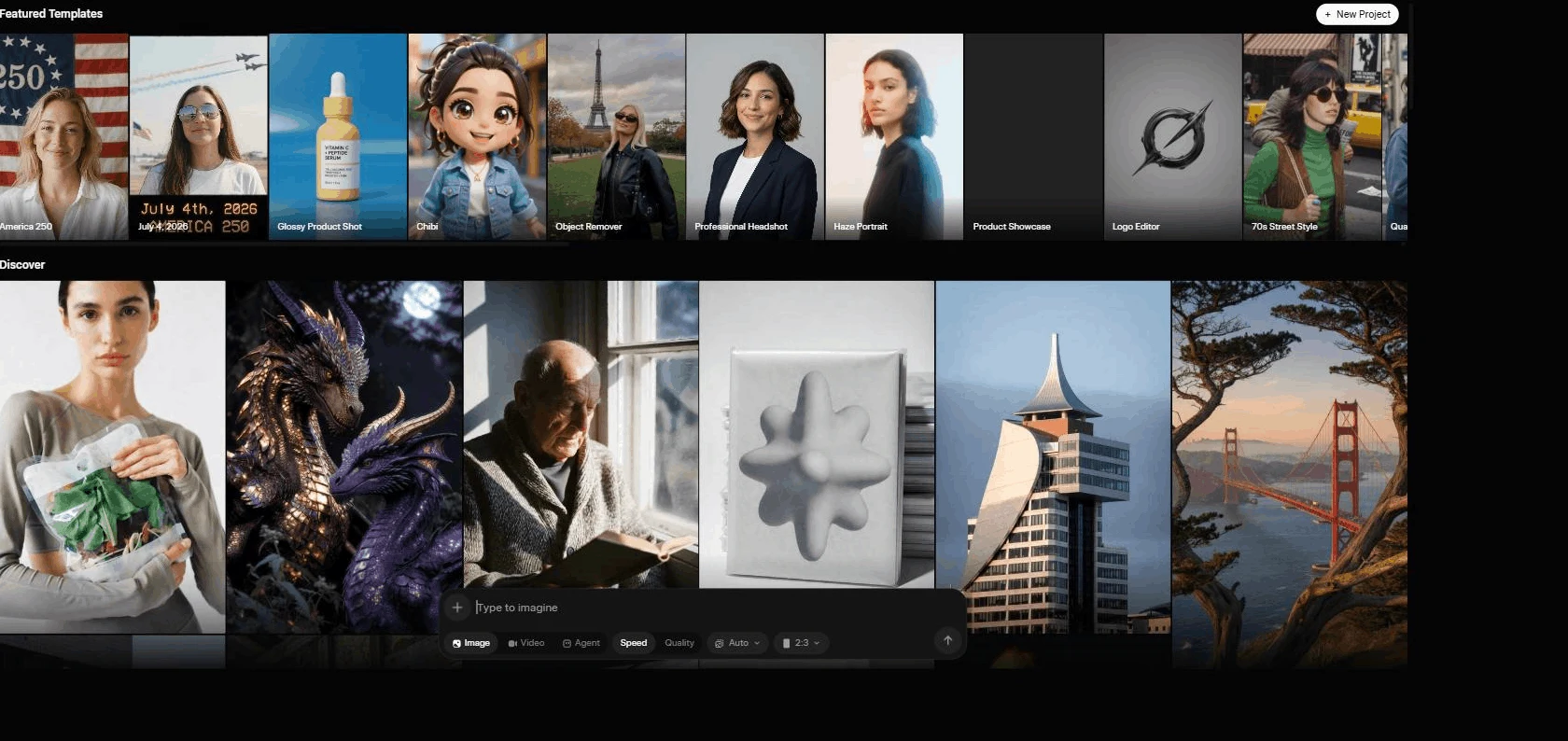
There are two core jobs Imagine does:
- Text to image and text to video. You write a prompt describing a scene, and Imagine produces a still image or a short clip.
- Image to video. You give it a starting image as the first frame, and it animates that image into a short video while trying to keep the scene consistent.
The video release reached a wider audience with Imagine v0.9, which xAI announced as a free rollout across products with native audio generation aligned to the visuals. Since then the model catalog has continued to move, and a newer video model, grok-imagine-video-1.5, sits in the official API catalog with stronger image-to-video behaviour. The practical takeaway is that Imagine is not one frozen feature. The interface and the underlying models change, so the live product page is always a better source than any single article, including this one.
It helps to be clear about what Imagine is not. It is not a research tool, it is not a fact source, and it is not a way to produce real screenshots or real photos of real events. Generated visuals are useful for concepts, drafts, and ideation. They are not proof of anything. If you need an authentic product screen or a real person, capture it yourself or use licensed media.
Where Grok Imagine runs
Imagine lives on three surfaces, and they are not interchangeable. Knowing which one you are on changes what you can do and how you pay.
The first surface is the web at grok.com/imagine. This is the cleanest place to start because it shows the current image and video positioning in a wide desktop layout you can verify directly. If you want to understand what Imagine offers today, open that page first.
The second surface is the Grok apps. The mobile apps expose Imagine inside the app experience, and the available options can look different from the web. Mobile is convenient for quick generation, but the layout, caps, and feature visibility may not match what you see on desktop on the same day.
The third surface is the xAI developer API. This is for building Imagine into your own product or automation rather than clicking through an interface. The API exposes named models you call from your own code, with per-unit billing instead of a consumer plan. The two relevant Imagine models in the catalog are grok-imagine-image and the video models grok-imagine-video and grok-imagine-video-1.5.
These surfaces are related but billed and gated differently. A consumer plan such as SuperGrok governs the app and web experience, while API usage is billed per image and per second of video. If you are not sure which decision you are making, ask whether you are clicking a button or writing code. That answer tells you which surface and which pricing model applies. For a fuller breakdown of the consumer side, see the SuperGrok plans and pricing guide, and for the wider picture of the product, see what is SuperGrok.
The mandatory watermark on every output
Every image and video Grok Imagine produces carries a mandatory Grok watermark. This is a fixed part of the product, not an option you can toggle off, and xAI's policy prohibits removing or obscuring that provenance mark. If you are planning to use Imagine output, design around the watermark from the start rather than assuming you can strip it later.
This matters for a few real situations:
- Commercial and brand work. If your brand guidelines or a client contract require clean, unmarked assets, raw Imagine output will not meet that bar on its own. Treat Imagine as a concept and draft tool in those pipelines, then produce the final asset through a method that gives you unmarked output you have the rights to use.
- Provenance and trust. The watermark is a transparency signal. It tells viewers the visual was AI-generated. For editorial and journalistic use, that is a feature, not a flaw, because it keeps you honest about what is real and what is generated.
- Policy compliance. Because removing the mark is prohibited, building a workflow that scrubs it is both a technical and a policy problem. Do not design a process that depends on getting rid of it.
The clean mental model is simple. Imagine is excellent for exploring directions, testing ideas, and drafting visuals. When you need a watermark-free production asset, that is a separate step with its own tools and rights.
Tier-gated resolution: why 720p can drop to 480p
Resolution in Grok Imagine is tier-gated, which is one of the most common sources of confusion. The headline behaviour is this: you can generate at 720p, but once you hit the 720p cap for your plan tier, Imagine falls back to 480p. So a video that came out crisp earlier in the day can come out softer later, not because the model changed, but because you crossed your tier's high-resolution allowance.
If your output suddenly looks lower quality, the cause is usually the cap, not a bug. The fix is to understand your tier's limit, pace your high-resolution generations, or move to a plan with a larger 720p allowance if high resolution is core to your work.
A few practical habits help here:
- Generate your most important, highest-resolution clips first, before you burn through the 720p allowance on tests.
- Use lower-resolution passes for rough iteration, then commit your allowance to the final version once the prompt is dialled in.
- Check the live caps on grok.com rather than trusting a number from an article. These limits move, and only your account screen tells you the truth for your plan today.
This tier-gating is also a reason not to judge Imagine's quality from a single late-in-the-session test. If you only ever see the 480p fallback because you exhausted your cap, you are not seeing the model at its best.
Free versus paid access
Grok Imagine launched free across products, which means you can try image and video generation without a paid plan in many cases. The complication is that the free image and video caps are volatile. Different sources report different free allowances, the limits change over time, and what is free can shift. Because of that, the honest answer to "how much do I get for free" is: check grok.com for your account right now.
This is also where pricing discipline matters. Consumer dollar prices for Grok plans are not reliably machine-verifiable, so this guide does not quote a monthly figure. For the current consumer cost of any plan, see x.ai/pricing and read the number live in your own browser. The one official consumer dollar figure worth knowing is the 5 dollar minimum for Extra Usage Credits, which is how paid users top up after they exhaust their shared weekly allowance.
That weekly allowance is the mechanic to understand on the paid side. Paid Grok plans share a weekly usage pool that you can spend across Grok products, and different products consume different amounts of it. When the pool runs out, you either buy Extra Usage Credits (5 dollar minimum) or upgrade. Imagine generations draw from the same shared pool as other Grok activity, so heavy visual work competes with your chat and other usage.
So how should you decide between free and paid for Imagine specifically? A reasonable rule:
- Stay on the free experience if you generate visuals occasionally, you are still evaluating whether the output fits your taste, or you have not confirmed the feature works in your country and on your device.
- Consider paying when you generate image or video drafts several times a week, you regularly hit visible usage messages, or you want higher-resolution output without constantly tripping the 720p cap.
Do not subscribe because one demo clip looked impressive. Subscribe when faster iteration and a larger allowance solve a problem you actually have on a repeated basis. The decision framework in the SuperGrok plans and pricing guide walks through this in more detail.
Spicy mode and age verification
Grok Imagine includes a "spicy" mode aimed at adult content. The gating, as commonly described, requires a qualifying paid plan plus 18-plus age verification. Treat the exact requirements as subject to change and confirm them in your own account, because the precise plan and verification rules can shift and are policy-sensitive.
A few points to keep this clear and safe:
- Spicy mode is age-gated by design. It is not part of the default experience, and it sits behind both a plan requirement and age verification.
- The watermark and content policies still apply. Adult-leaning output is not exempt from the mandatory Grok watermark or from xAI's broader usage rules.
- If you are evaluating Imagine for a business, a classroom, a brand account, or any shared environment, the existence of an adult mode is a governance consideration. Make sure the people and accounts using it understand the policy and the age gate.
The responsible framing is straightforward. The feature exists, it is gated behind a paid plan and an age check, and the specifics are the kind of thing you verify live rather than assume from a write-up.
How to verify current limits before you commit
Because so much of Imagine is volatile (free caps, resolution allowances, plan gating, and the model versions themselves), the single most useful skill is knowing how to check the current state quickly. Build this into your routine before you depend on Imagine for anything that matters.
Use this short verification pass:
- Open grok.com/imagine on desktop and read the current image and video positioning.
- Sign in to the exact account whose plan you expect to use, since access differs by plan and surface.
- Look for any visible usage or cap messages before you start a large batch.
- Note whether image, video, image-to-video, and editing options actually appear for your account.
- For developer questions, open the xAI model docs to confirm the current Imagine model names and behaviour.
- For account, watermark, and resolution policy questions, read the Grok FAQ.
This habit protects you from two common mistakes: assuming a friend's free allowance matches yours, and assuming an article's numbers are still accurate. The product page and your own account screen are the authorities. Everything written about Imagine, including dated caps and resolutions, is a snapshot that can age.
If you are weighing Imagine against other visual tools, the same verification logic applies to the competition. Test your own task on each, because output quality depends on the prompt, the model version, the surface, and what you personally consider usable. The Grok versus ChatGPT, Claude, and Gemini comparison makes the same point about testing rather than trusting marketing.
Who Grok Imagine is for
Imagine fits some workflows well and others poorly. Being honest about that saves you a wasted subscription.
It is a strong fit when:
- You are a social creator or marketer who needs fast visual concepts and short video drafts to test directions.
- You already use Grok for chat or research and want image and video in the same place.
- You value the transparency of a built-in AI watermark for editorial or explainer work.
- You want to prototype a video idea cheaply before committing to a full production.
It is a weaker fit when:
- You need clean, unmarked, brand-safe final assets, because the mandatory watermark and editorial-grade output limits get in the way.
- You require exact, repeatable, high-resolution output at scale, where tier-gated 720p caps will frustrate you on a consumer plan.
- You are really after API automation rather than a consumer app, in which case the developer surface and per-unit billing are the right path, not a SuperGrok plan.
For a deeper, prompt-by-prompt walkthrough of getting good results, read the companion Grok Imagine image and video guide. For the wider product context and where Imagine sits in xAI's lineup, the Grok Imagine topic hub collects the related coverage.
Bottom line
Grok Imagine is xAI's image and video generation feature, part of the Aurora line, available on grok.com/imagine, in the Grok apps, and through the xAI API. The two rules that shape everything are the mandatory Grok watermark on every output and the tier-gated resolution that drops 720p to 480p once you hit your cap. Free access exists but the caps move, spicy mode is gated behind a paid plan and age verification, and the safest habit is to verify current limits on grok.com before you build anything on top of it.
If you want a single sentence to carry away: treat Imagine as a fast, transparent visual drafting tool inside the Grok ecosystem, check your live caps and plan before you commit, and reach for a different tool when you need watermark-free, high-resolution production assets.
Questions readers ask
What is Grok Imagine in one sentence?
Grok Imagine is xAI's image and video generation feature, part of the Aurora line, available on grok.com/imagine, in the Grok apps, and through the xAI developer API.
Does every Grok Imagine output have a watermark?
Yes. All Grok Imagine output carries a mandatory Grok watermark, and removing or obscuring that provenance mark is prohibited under xAI policy.
Why did my video come out at 480p instead of 720p?
Resolution is tier-gated. Once you hit the 720p cap for your plan, Grok Imagine falls back to 480p. Check grok.com for the current cap on your tier.
Do I need a paid plan for Grok Imagine?
Imagine launched free across products, but free image and video caps vary and change often. Confirm what your account includes on grok.com before you rely on it.
What is spicy mode and who can use it?
Spicy mode is an adult content setting that requires a qualifying paid plan plus 18-plus age verification. Treat the exact gating as subject to change and verify it in your account.
Sources checked
- Grok ImagineGrok
- Grok website and apps FAQxAI Docs
- xAI model docsxAI Docs
- xAI newsxAI
- xAI pricingxAI