
xAI API pricing is usage based. Start with Grok 4.3 token rates, then add tool calls, Priority Processing, Batch API discounts, Imagine media costs, voice usage, storage, and rate tier limits.
As of July 1, 2026, the most useful xAI API pricing question is not "what does Grok cost?" It is "which parts of my request are billable, and which knobs change the bill?"
xAI Docs lists exact API rates for text models, Grok Imagine image and video models, voice, tool calls, storage, Batch API discounts, Priority Processing, and rate limit tiers. That makes API pricing much more verifiable than consumer plan pricing. Consumer SuperGrok prices still need a live checkout check in your own country. API rates can be read directly in the developer docs.
API pricing is not a SuperGrok subscription
The first mistake is mixing consumer plans and developer billing. A personal Grok or SuperGrok plan is for using Grok through a product surface. The xAI API is for building software that calls xAI models directly. They solve different problems.
Use a consumer plan guide when your question is:
- Should I pay for Grok in the app or on the web?
- Do I need SuperGrok Heavy?
- Should I use Grok through X?
- How do I cancel or manage a subscription?
Use API pricing when your question is:
- How much will 100,000 model calls cost?
- Which model should my product call?
- Should I cache prompts?
- Should I use Batch API for offline jobs?
- What does video generation cost per second?
- How do rate limits affect launch planning?
If you are still choosing a personal plan, start with SuperGrok plans and pricing. If you are building a product or internal tool, keep reading. API billing is a usage model, not a monthly plan comparison.
Current Grok API text model rates
xAI Docs lists prices in USD and tells developers to use the models page for per-model details. The practical baseline is the Chat API table.
| Model | Context | Input | Cached input | Output |
|---|---|---|---|---|
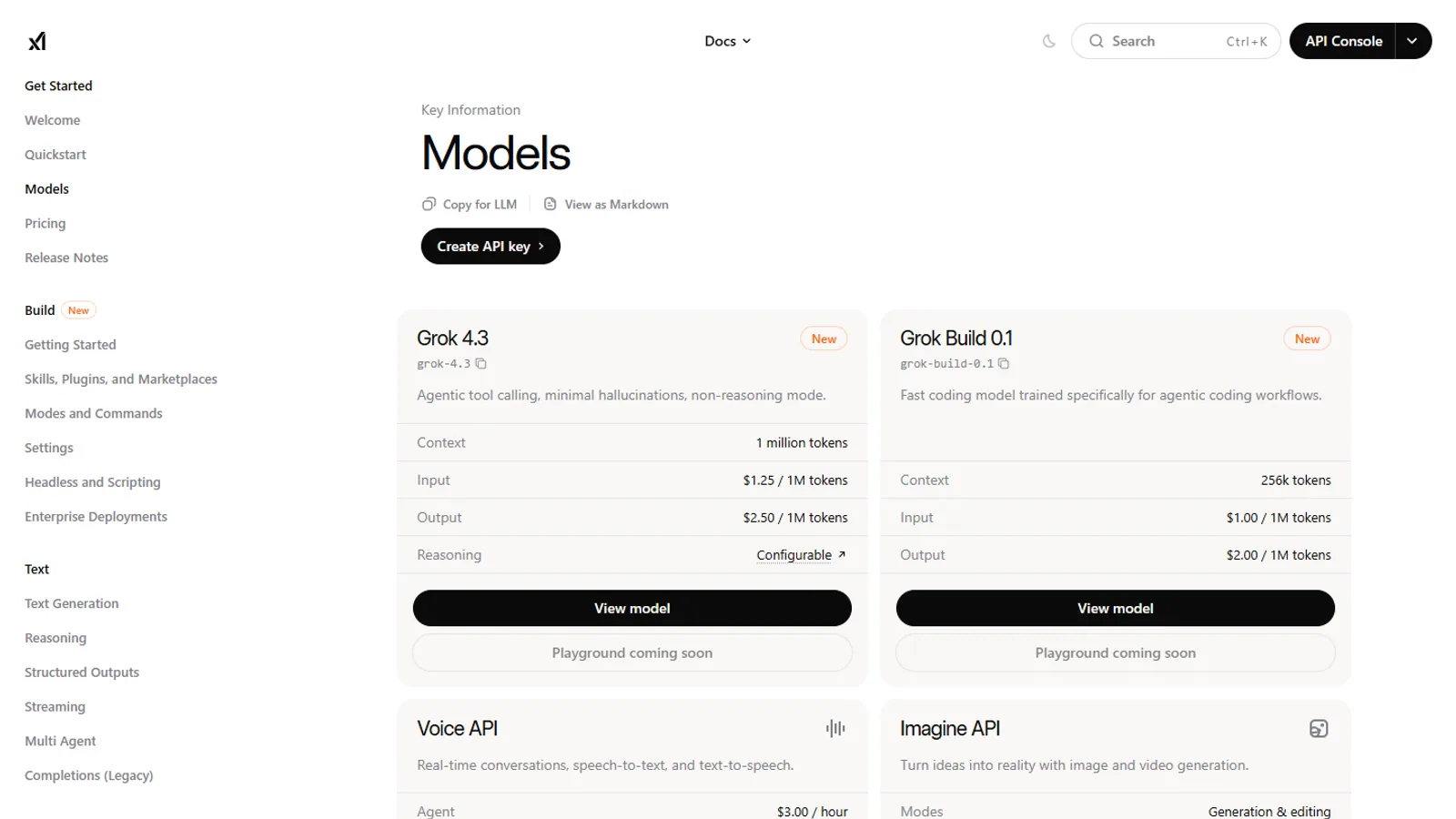
| grok-4.3 | 1M tokens | $1.25 per 1M tokens | $0.20 per 1M tokens | $2.50 per 1M tokens |
| grok-4.20 reasoning and non-reasoning variants | 1M tokens | $1.25 per 1M tokens | $0.20 per 1M tokens | $2.50 per 1M tokens |
| grok-4.20 multi-agent | 1M tokens | $1.25 per 1M tokens | $0.20 per 1M tokens | $2.50 per 1M tokens |
| grok-build-0.1 | 256k tokens | $1.00 per 1M tokens | $0.20 per 1M tokens | $2.00 per 1M tokens |
xAI describes Grok 4.3 as the default choice for most non-specialized text work in its models page. It is also the cleanest model to use for cost planning because the docs provide a dedicated model page with context window, input rate, cached input rate, output rate, aliases, and rate limits.
That does not mean every request is cheap just because the per-token rate looks low. Long context, large outputs, tool calls, repeated retries, and priority requests can dominate the final bill. A small prompt with a long answer can cost more than a long prompt with a short answer if the output is large enough. A support workflow that retries failed calls can quietly double spend. A research workflow that invokes search tools can add tool charges on top of token charges.
Token math without hand waving
Token pricing is easiest to understand if you split every request into three buckets:
| Bucket | What it includes | Why it matters |
|---|---|---|
| Input tokens | User message, system instructions, conversation history, file text, and tool context sent to the model | Large prompts and long histories raise cost before the model writes anything |
| Cached input tokens | Reused prompt content served from cache | Cached input is priced lower in xAI Docs, so stable prompts can reduce repeat cost |
| Output tokens | The model response | Long answers, code blocks, reports, and structured JSON raise cost |
Here is a simple Grok 4.3 estimate using the xAI Docs rates from July 1, 2026.
| Example request | Input cost | Output cost | Estimated total |
|---|---|---|---|
| 10,000 input tokens and 2,000 output tokens | 10,000 / 1,000,000 x $1.25 = $0.0125 | 2,000 / 1,000,000 x $2.50 = $0.005 | $0.0175 |
| 50,000 input tokens and 5,000 output tokens | $0.0625 | $0.0125 | $0.075 |
| 200,000 input tokens and 10,000 output tokens | $0.25 | $0.025 | $0.275 |
The table is deliberately plain. It ignores taxes, account credits, tool calls, priority, batch discounts, storage, failed retries, and high-context pricing details. Use it to understand the shape of the bill, then read the official xAI pricing page before committing production spend.
For repeated workflows, cached input can matter. If your application sends the same long system prompt or policy context across many calls, caching can reduce the cost of that reused content. The exact benefit depends on how much of the prompt is cacheable, how often it repeats, and how the API request is structured.
Cost examples for real workflows
Use realistic workloads, not demo prompts. A demo prompt hides the parts that usually make production expensive: history, source text, tool calls, retries, moderation failures, logs, and user behavior.
Customer support assistant
Assume one support answer uses 3,000 input tokens and 700 output tokens on Grok 4.3.
Per answer:
- Input: 3,000 / 1,000,000 x $1.25 = $0.00375.
- Output: 700 / 1,000,000 x $2.50 = $0.00175.
- Estimated text total: $0.0055.
At 10,000 answers, the text portion is about $55 before tool calls, retries, storage, and any priority usage. If the assistant searches documentation, reads files, or calls web tools, add those charges separately. If 20 percent of requests retry once, the effective cost rises.
Research summary tool
Assume one summary uses 40,000 input tokens from source material and 3,000 output tokens.
Per summary:
- Input: 40,000 / 1,000,000 x $1.25 = $0.05.
- Output: 3,000 / 1,000,000 x $2.50 = $0.0075.
- Estimated text total: $0.0575.
At 1,000 summaries, the text portion is about $57.50. If the tool uses xAI Web Search, xAI Docs lists tool invocation charges that need to be added. If the workload is not time sensitive, Batch API may be a better fit because xAI says text and language batch requests can receive a discount from standard token pricing.
Coding assistant
Assume a coding agent call uses 25,000 input tokens and 6,000 output tokens. Using Grok Build 0.1 rates:
- Input: 25,000 / 1,000,000 x $1.00 = $0.025.
- Output: 6,000 / 1,000,000 x $2.00 = $0.012.
- Estimated text total: $0.037.
That is only the model call. A coding agent can become more expensive when it repeatedly reads context, retries edits, runs tools, or generates long diffs. Cost control usually comes from narrowing context, caching stable instructions, avoiding unnecessary retries, and separating quick lint-like tasks from deeper agentic work.
Priority Processing changes the math
xAI introduced Priority Processing in the June release notes. The docs say you can request higher scheduling priority by setting service_tier: "priority" and that the response reports the tier actually applied.
The pricing page says Priority Processing is billed at a 2x premium over standard text token rates. It also says the multiplier applies to input, output, cached, and reasoning token types, with cache discounts applied before the multiplier. The important detail is confirmation: xAI says priority billing applies only when the response confirms that priority was used.
Use priority for jobs where latency matters:
- Interactive chat that users are waiting on.
- Paid workflow steps with a tight user experience target.
- Launch windows where slow responses would cause visible failure.
- Time-sensitive internal operations where waiting costs more than tokens.
Avoid priority by default for jobs where latency is less important:
- Overnight report generation.
- Offline data labeling.
- Draft generation that humans review later.
- Backfills and migrations.
- Non-urgent evaluation runs.
In production, log the returned service_tier. Without that field in your logs, you cannot easily separate standard requests from priority requests when the invoice arrives.
Batch API can lower text cost
xAI Docs describe Batch API as asynchronous processing for large request volumes, with most jobs completing within 24 hours. The pricing page says batch requests can cut token costs by 20 percent to 50 percent for text and language models, while image and video generation through Batch API are billed at standard rates.
That makes Batch API attractive when the user is not waiting live:
- Nightly summaries.
- Evaluation sets.
- Document tagging.
- Backfills.
- Content classification.
- Large internal analysis jobs.
Batch API is less useful when the user expects a response in seconds. It also changes operations. You need job submission, status tracking, result handling, failure handling, and a queue-friendly product experience. The discount is not worth it if the delayed result breaks the workflow.
A practical rule: start with standard calls for interactive features, then move repeatable offline jobs to Batch API once the prompt and output format are stable.
Imagine API costs for image and video
Grok Imagine pricing is different from text pricing. You do not estimate it with input and output tokens alone. xAI prices image and video by media unit, resolution, and seconds.
As of July 1, 2026, xAI Docs list these Imagine API rates:
| Model | Input charge | Output charge |
|---|---|---|
| grok-imagine-image | $0.002 per input image | $0.02 per output image at 1K or 2K |
| grok-imagine-image-quality | $0.01 per input image | $0.05 per 1K output image, $0.07 per 2K output image |
| grok-imagine-video | $0.01 per input second for video, $0.002 per input image | $0.05 per output second at 480p, $0.07 per output second at 720p |
| grok-imagine-video-1.5 | $0.01 per input image | $0.08 per output second at 480p, $0.14 per output second at 720p, $0.25 per output second at 1080p |
The video model page adds an important product detail: grok-imagine-video-1.5 currently supports image to video, not text to video. For text to video, check the general video generation docs and the model list before building the workflow.
Cost examples:
| Job | Estimated media cost |
|---|---|
100 standard images with grok-imagine-image |
100 x $0.02 = $2.00 |
100 quality 2K images with grok-imagine-image-quality |
100 x $0.07 = $7.00, plus input image charges if editing from images |
50 five-second 720p videos with grok-imagine-video |
50 x 5 x $0.07 = $17.50, plus input charges where applicable |
20 eight-second 1080p videos with grok-imagine-video-1.5 |
20 x 8 x $0.25 = $40.00, plus input image charges |
The big media cost driver is not the prompt. It is volume, duration, resolution, model choice, retries, and variation count. If your product generates four video options for every user action, the cost is four times the single-output estimate.
For manual creative work, read the Grok Imagine guide. For API work, keep a separate budget model for media generation.
Voice, tools, files, and storage costs
Text tokens and media output are not the whole bill. xAI Docs also list voice, tool, file, and storage pricing.
Voice pricing in xAI Docs includes:
| Mode | Listed rate |
|---|---|
| Realtime | $0.05 per minute, shown as $3.00 per hour |
| Realtime text input | $0.004 per message |
| Text to Speech | $15.00 per 1M characters |
| Speech to Text | $0.10 per hour for REST, $0.20 per hour for streaming |
Tool pricing is separate from token pricing. xAI Docs list web search, X search, and code execution at $5 per 1,000 calls, file attachment search at $10 per 1,000 calls, and collections search at $2.50 per 1,000 calls. Image understanding and X video understanding are described as token based in that table.
Files and collections also have storage and download costs. The pricing page lists file storage per GiB per day, collection storage per GiB per day, and download charges per GiB downloaded. If your app stores generated assets, source files, or retrieval collections, include storage in the estimate instead of treating it as free.
This is where many API budgets go wrong. The model rate is visible, but tool calls, storage, and retries are where real product behavior shows up.
Rate limits affect cost planning
Rate limits are not a price, but they shape launch planning. xAI Docs say each team has per-model requests per second and tokens per minute. The docs also say tiers are based on cumulative API spend since January 1, 2026, with thresholds for Tier 0 through Tier 4 and Enterprise available on request.
The listed spend thresholds are:
| Tier | Spend threshold |
|---|---|
| Tier 0 | $0 |
| Tier 1 | $50 |
| Tier 2 | $250 |
| Tier 3 | $1,000 |
| Tier 4 | $5,000 |
| Enterprise | Available on request |
xAI says tiers unlock automatically as spend increases and do not downgrade after qualification. For text models, the rate limit table shows hard requests-per-second and tokens-per-minute caps by tier. For Voice and Imagine limit increases, the docs point developers to sales.
For a small prototype, Tier 0 may be enough. For a public launch, rate limits should be part of the launch checklist. A product can be affordable on paper and still fail if the rate cap is too low for a usage spike.
How to build a practical Grok API cost model
Use a simple spreadsheet before writing production code.
Start with these columns:
| Column | What to enter |
|---|---|
| Workflow | Chat, support answer, summary, image, video, voice, search, or batch job |
| Monthly volume | Expected number of user actions or jobs |
| Model | Grok 4.3, Grok Build 0.1, Imagine model, or voice mode |
| Average input | Tokens, images, seconds, minutes, or characters |
| Average output | Tokens, images, seconds, minutes, or characters |
| Tool calls | Expected web, X, code, file, or collection calls |
| Retry rate | Share of requests that run more than once |
| Priority share | Share of text calls that request and receive priority |
| Batch share | Share of offline text calls that can use Batch API |
| Storage | Files, collections, generated media, and downloads |
Then estimate three cases:
- Low case: conservative usage, short outputs, few retries.
- Expected case: realistic product usage based on testing.
- High case: launch spike, longer outputs, more retries, more media variations.
Do not use a single average if your product has very different workflows. A normal chat answer, a 200,000-token document summary, and a 1080p video generation job should be separate line items.
Cost controls that do not weaken the product
Good cost control is usually product design, not panic cutting.
Use these controls first:
- Pick the model for the job instead of sending everything to one default.
- Keep stable instructions cache-friendly.
- Summarize long conversation history when exact text is no longer needed.
- Limit maximum output length for routine tasks.
- Use structured outputs to reduce rambling answers.
- Reserve Priority Processing for latency-sensitive paths.
- Move offline jobs to Batch API when the delay is acceptable.
- Track tool calls separately from model tokens.
- Put media generation behind explicit user actions.
- Ask users to choose resolution before expensive video generation.
- Log retries, moderation failures, and abandoned jobs.
Avoid controls that make the product misleading. Do not silently downgrade a paid workflow, hide quality changes, or pretend a media action is free when it is expensive. Show users where high-cost actions happen.
What to monitor after launch
Once users arrive, estimates become less important than logs.
Monitor:
- Input tokens per request.
- Output tokens per request.
- Cached input share.
- Tool calls per request.
- Priority requests and confirmed priority responses.
- Batch jobs submitted, completed, and failed.
- Media generation count by model, resolution, and duration.
- Voice minutes and text to speech characters.
- Storage size and downloads.
- Retry rate by endpoint.
- 429 rate limit errors.
- Cost per successful user action.
Cost per successful user action is the strongest metric. A cheap failed request is not cheap if it creates retries, support tickets, or user churn. A more expensive request can be worth it if it reliably completes a valuable job.
Common pricing mistakes
Mistake one: comparing API rates with consumer plan prices. They are different products. A what is SuperGrok reader and an API developer are making different decisions.
Mistake two: estimating only the first call. Real systems retry, search, store files, run tools, generate variants, and sometimes discard outputs.
Mistake three: ignoring output length. Output tokens are often more expensive than input tokens, and long answers can dominate routine costs.
Mistake four: turning on Priority Processing everywhere. The 2x premium can be sensible for live user paths, but it is wasteful for offline work.
Mistake five: using high-resolution video defaults. Video cost scales with seconds, resolution, model, and variant count.
Mistake six: treating rate limits as an afterthought. A launch plan should include rate tier, expected RPS, expected TPM, and fallback behavior for 429 errors.
Bottom line
The xAI API can be cost-planned because the developer docs expose the main billing pieces: text tokens, cached tokens, Imagine media rates, voice rates, tool calls, storage, batch discounts, priority multipliers, and rate limit tiers.
Start with the official xAI pricing page, build a workload spreadsheet, separate interactive and offline jobs, and keep consumer SuperGrok plan decisions out of API math. For most text products, the key question is not whether Grok 4.3 has a low per-token rate. It is whether your product controls context, output length, tools, priority, media generation, retries, and rate limits well enough for the bill to match the value.
Next, read Grok vs ChatGPT vs Claude vs Gemini if you are comparing model ecosystems, or Grok Imagine guide if your API workload is visual.
Questions readers ask
Is xAI API pricing the same as SuperGrok pricing?
No. SuperGrok is a consumer plan decision. xAI API pricing is usage based and is documented separately in xAI Docs.
What is the simplest way to estimate Grok API text cost?
Estimate input tokens, cached input tokens, output tokens, and any tool calls. Multiply each token bucket by the current per-million-token rate from xAI Docs.
Does Priority Processing always double the bill?
No. xAI says the priority multiplier applies only when the response confirms that priority service was actually used.
Sources checked
- xAI developer pricingxAI Docs
- xAI developer modelsxAI Docs
- Grok 4.3 model pagexAI Docs
- xAI Priority ProcessingxAI Docs
- xAI rate limitsxAI Docs
- xAI release notesxAI Docs